MCP Consulting
I connect AI assistants like ChatGPT and Claude to your email, CRM, files and databases through MCP. You decide what the AI can see and what it can do.

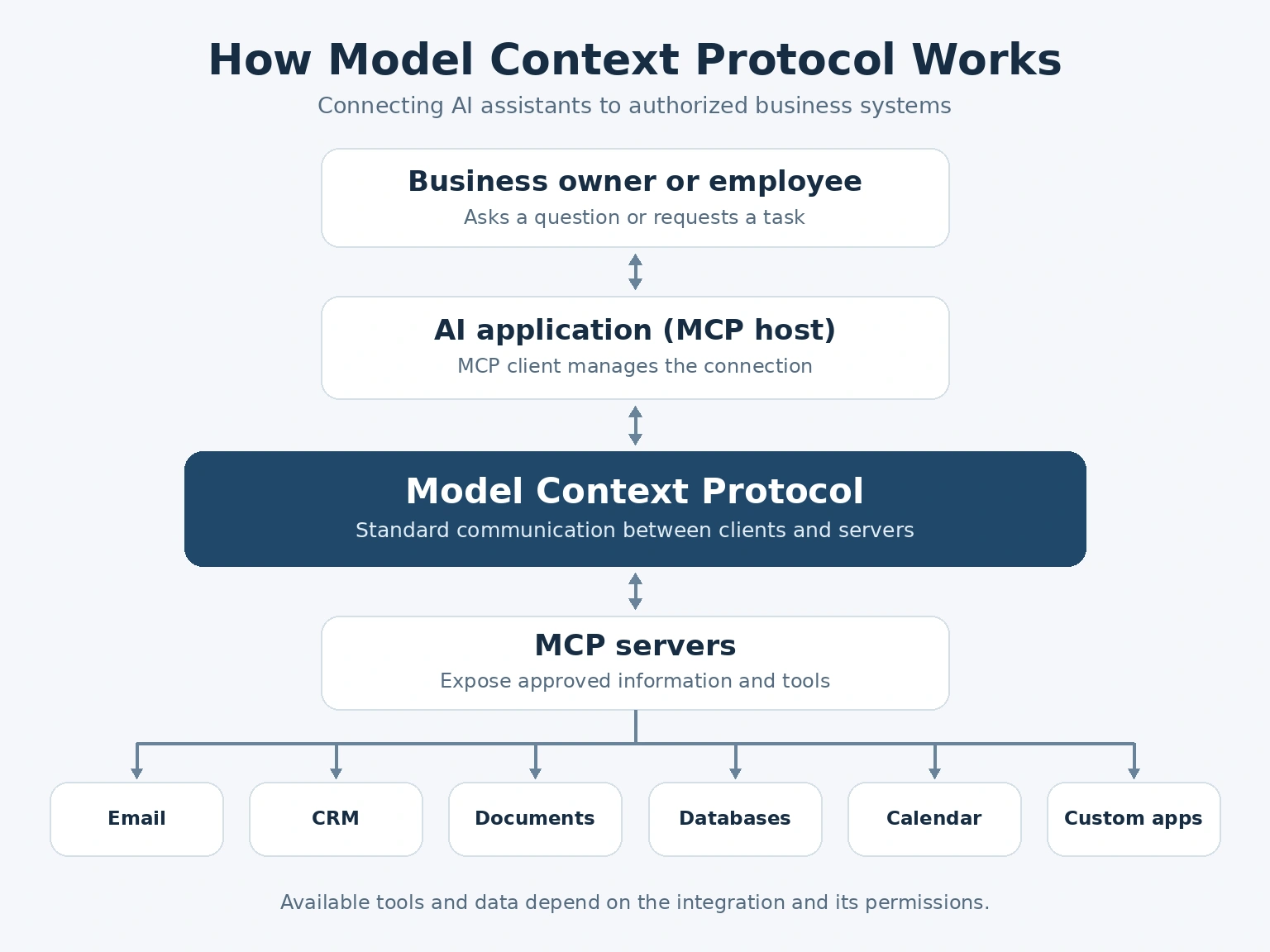
MCP (Model Context Protocol) is an open standard that lets an AI assistant ask your other software for information, or take an action you've allowed. You stop copying and pasting into a chat window. You ask once, and the assistant gets what it needs.
It works with AI tools you may already pay for, including ChatGPT, Claude and Gemini. Your software stays where it is.
Read my plain-English guide to MCP →Many tools already offer an MCP connection. I check what you use, test what exists, and set it up if it does the job.
Good fit: Businesses on well-known software that may already have a connector.
When nothing ready-made fits, I build a connector for the system you already have. That includes internal databases, older software and tools built just for you.
Good fit: Businesses whose key system no AI tool supports.
Together we decide what the AI can read, what it can change, and what needs a person to approve. Every connection starts with the least access that does the job.
Good fit: Anyone connecting customer, financial or staff data.
I show your team how to use it, with written how-tos. After launch I keep it running with fixes, updates and tuning.
Good fit: Teams who want it working on day 90, not just day one.
My own systems
My business email runs on my own server, so no ready-made AI connector could reach it. I built a custom MCP server for it in a few days. Now one question searches both inboxes, and the AI drafts replies from the thread for me to edit and send.
See how I built it →2
inboxes, one connector
3
AI tools: ChatGPT, Claude and Gemini
A few days
from idea to working connector
1
We look at your software and where connected AI would save time.
2
Scope, timeline and price, in writing, before any work starts.
3
I start with read-only access and test it on your real questions.
4
Hands-on training, with written how-tos.
5
Fixes, updates and tuning after launch.
Connecting AI to your business systems is not a simple software install. This is how I set up every connection.
Read the AI & Data Policy →The AI only sees the data the job needs.
It starts read-only. It can change records only when you ask for that.
Anything that sends, deletes or spends money waits for a person to approve it.
Access needs a sign-in, and you can switch it off at any time.
Do I need a custom MCP server?
Often not. Many tools already have a connector. I check that first, and I only build when nothing ready-made fits.
Which AI tools does it work with?
MCP works with ChatGPT, Claude, Gemini and other tools that support it. Features vary by plan, so I check yours during the assessment.
Will it work with my current software?
Usually, yes. If your software has an API or a database, I can usually connect to it. I confirm this during the assessment.
What does it cost?
Every project is quoted in writing from your free assessment, so you know the price before we start. AI tools also have running costs, and I'll show you the monthly number up front.
Who owns what you build?
You do. The code and the work are yours once the project is finished.
Is my data safe?
You decide what the AI can reach. I start with the least access that does the job, and I tell you which AI provider sees what. My AI & Data Policy has the details.
Start with the free assessment. One session, a written summary, and a clear proposal. You decide what happens next.